
Authentication and usage
Usage tracking and limits
Speechineer measures what you use in units. Every usage record carries five tags, so you can read usage the way you think about your software — and limits are set as quotas, on every level a record is tagged with.
Usage
A unit is the one measure for everything Speechineer does for you — the seconds of audio it transcribes and the values it extracts while a session listens, and each text extraction call — each counted at the rate of the model that did it. A session consumes units only while it listens or extracts; a session that is connected but not listening consumes nothing.
Tip
Usage attribution
Every session carries five dimensions; every usage record is tagged with all of them:
| Dimension | Set by | The question it answers |
|---|---|---|
| Workspace | which workspace the API key (or token) belongs to | How much does this piece of software use, in total? |
| API key | the API key the client was created with — one per use case | How much of it came from one use case? |
| Account | the account option (Unsigned) or the token's account_key claim (Signed) | How much of it did one end user spend — and who reached their cap? |
| Form + version + language | the form key and version your session names, plus its language option | How much of it went to one form — and did a new version change that? |
| Session | created per start(); its id is in the session state — join on it in your own logs | How much did one interaction cost? |
Usage review
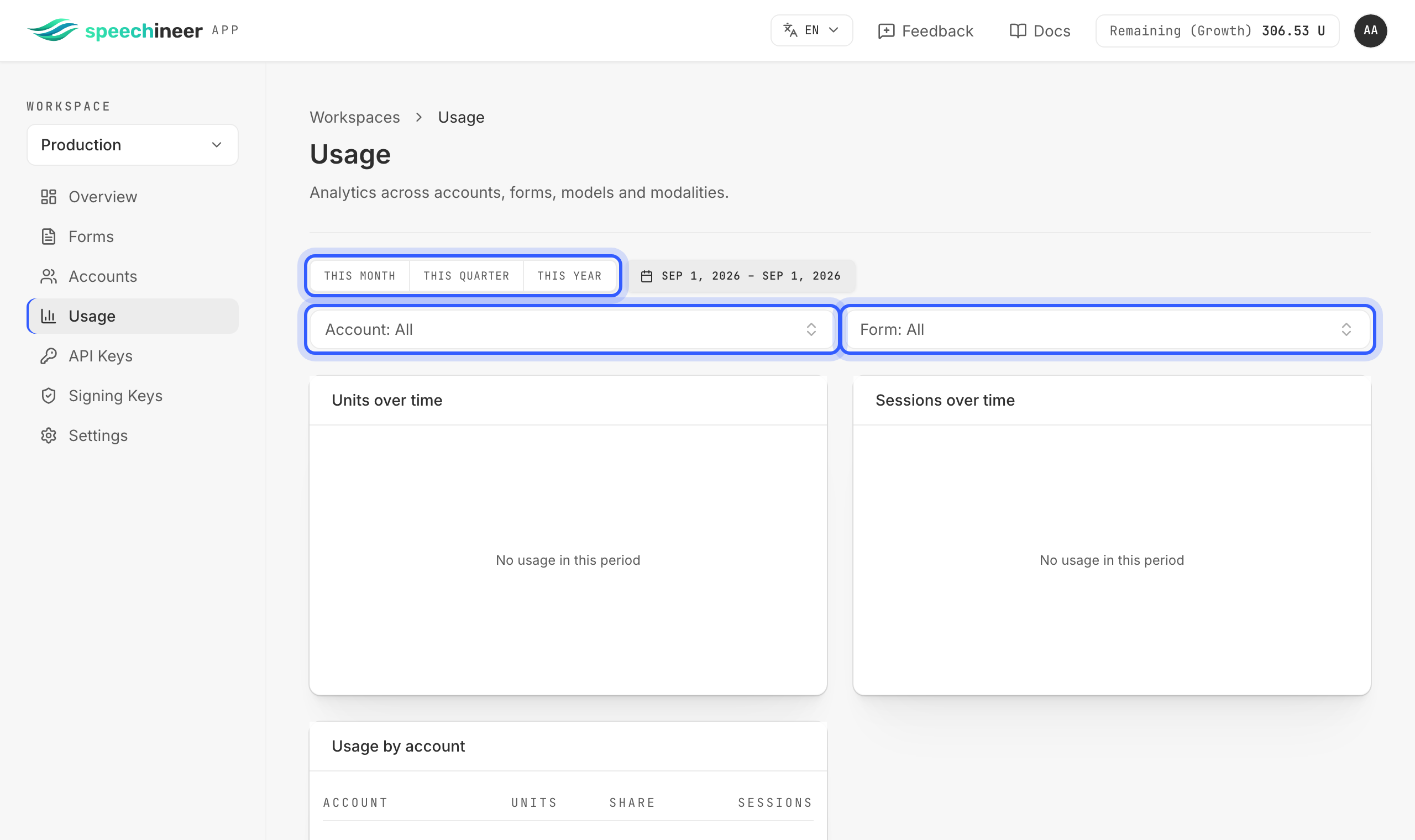
The Usage page shows units and sessions over time for the period you pick, filtered by account and by form, then broken down by account, by form and by form version — down to the individual usage records. Records are immutable; a correction is recorded as an adjustment record. In your own analytics, log the session id from the session state and join on it.
Limits
Limits come in two kinds. Quotas are the ones you set — a number of units within a period — on any of the levels usage is attributed to: the workspace, an account, an API key, a form. Several quotas can stack: on one level — a monthly budget and a daily brake on the same API key — and across levels — a session carries one workspace, one API key, one account and one form, so every quota set on any of those four applies to it at once. A session has to fit within all of them: as soon as any one is used up, sessions are refused until that quota's period starts again, however much the others still have left. Plan limits are not quotas — they come with your subscription: the units available to you in a billing cycle, and how many sessions may run at once.
Where limits exist
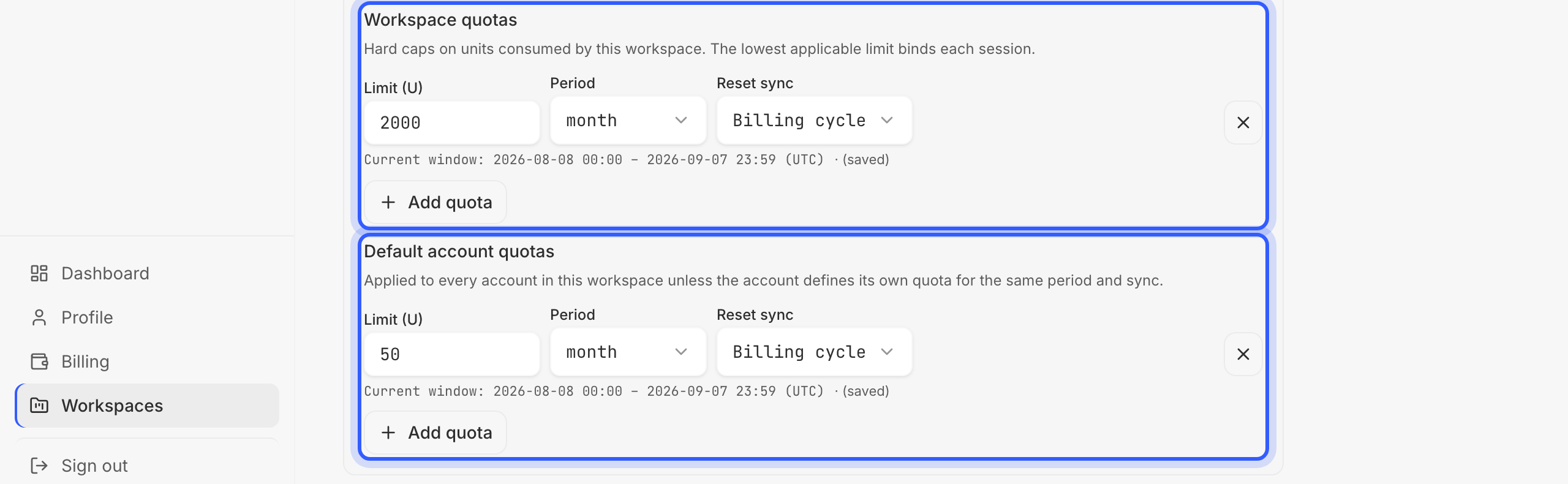
Quotas — set by you, in the workspace:
- Workspace — caps everything the workspace runs. Set it under Settings › Quotas › Workspace quotas, the upper block above.
- Account — caps one end user; this is the quota you will use most. A default for every account is set under Settings › Quotas › Default account quotas, the lower block above. An account's own quota is set as described in Authentication and usage › Accounts › Quotas.
- API key — caps one use case. Set it as described in Authentication and usage › API keys › Quotas.
- Form — caps one form, all its versions and languages together. Set it as described in Configure the form › In the workspace › Settings › Quotas.
Plan limits — set by your subscription:
- Available units — your plan gives you a number of included units per billing cycle; once they are used up, the prepaid units you have bought are spent. When both are gone, sessions stop with
PLAN_ALLOWANCE_EXHAUSTED— unless the workspace may run on billable overage (Settings › Quotas › Allow billable overage). Then it keeps going and the extra units are billed at the end of the cycle, up to the overage cost limit you set for that workspace, in euros, and your plan's overall ceiling; reaching either stops it withOVERSPEND_LIMIT_REACHED. Your balances are under Billing. - Concurrency — caps how many sessions may run at once, per plan, with a per-account override where you need one.
The rule is the same for all of them: a unit counts against every one of them at once, each is checked when a session starts or a text extraction runs, and the first one reached fails that request with a code naming the level — nothing ever overspends silently. A reached quota on one account stops that account only; a reached quota on an API key stops everything running on that API key.
Reacting to limits
| Code | Whose problem | What to do |
|---|---|---|
| ACCOUNT_QUOTA_EXCEEDED | This end user reached the quota set for them; every other user is unaffected. | Say so in your UI. If the cap is too tight, raise the account's quota in the workspace or from your backend — it applies to the next session. |
| API_KEY_QUOTA_EXCEEDED | One use case's budget is spent — everything running on that API key stops. | Alert your operations channel, not the end user; raise the API key's quota if the budget was too small. |
| WORKSPACE_QUOTA_EXCEEDED / FORM_QUOTA_EXCEEDED | A quota you set on the whole workspace, or on one form, is reached. | Operations: raise it under Settings › Quotas, or in the form's settings. |
| PLAN_ALLOWANCE_EXHAUSTED / OVERSPEND_LIMIT_REACHED | Your plan's included and prepaid units are gone — or, with billable overage on, its cost limit is reached. | Billing: buy prepaid units, raise the overage cost limit, or change plan. |
| CONCURRENCY_LIMIT_REACHED | Too many sessions are running at once. | Retry a moment later — the one limit code worth an automatic retry. |
Additional information in
Example: a usage limit
A practice-management product sells to clinics and meters voice input per clinic, so each clinic is an account. It uses Speechineer in two places, each with its own API key: patients dictate the patient intake questionnaire on a tablet at the front desk, and physicians dictate their consultation notes after a visit; a third API key, Development, is the one the vendor's own engineers use. The workspace as a whole is capped at 2 000 units a month; patient intake at 1 000, consultation notes at 800, and development at 100, so a test run can never eat a production budget. Every clinic starts with the workspace's default of 50 units a month; a clinic on a bigger contract gets its own quota from the backend at onboarding — Hillside Practice, say, has 200 units a month with a 20-unit daily brake, and both apply to it instead of the default.
reached →
WORKSPACE_QUOTA_EXCEEDED
API keys — one per use case
reached →
API_KEY_QUOTA_EXCEEDED
Accounts — one per clinic
reached →
ACCOUNT_QUOTA_EXCEEDED
When Riverside Clinic reaches 50 units, its sessions fail with ACCOUNT_QUOTA_EXCEEDED — whether at the front desk or in the consulting room — and Riverside's staff see a message in your UI while every other clinic keeps going. If patient intake as a whole reaches 1 000, every intake session fails with API_KEY_QUOTA_EXCEEDED — even for a clinic that has plenty of its own quota left that month or that day. That clinic can still dictate consultation notes, though: they run on a different API key, whose budget is untouched. If the workspace reaches 2 000, everything in it fails with WORKSPACE_QUOTA_EXCEEDED — both alerts for your operations channel. Raising Riverside's quota mid-month is one change on its account, in the workspace or from your backend; it applies to its next session.